


Sib tham sib tw dawb
Koj kev tshaj lij kev sib tham sib tham
Qab teb yog ib tug neeg lub tuam txhab uas muaj lub luag haujlwm rau cov qauv tsim thiab tsim cov khoom siv kho vajtse. Raws li kev tsim khoom siv rau Southwing Technology, Sab Qab Teb tsis yog tsuas yog lub caij nyoog ntawm kev tsim kho tshiab thiab ua cov khoom lag luam cov khoom lag luam tab sis kuj yog ib lub cim ntawm lub tuam txhab muaj zog.
Peb cov khoom lag luam pov thawj encompass thiab cov kev daws teeb meem sib xyaw, nrog rau cov neeg siv hluav taws xob sib tham, kov cov vaj huam sib luag hauv chav kawm, kov lub vaj huam sib luag



Vim li cas thiaj xaiv peb
Tshwj Xeeb Customization
Raws li cov neeg siv khoom xav tau, yav qab teb kev pabcuam muab cov qauv kev tsim kho thiab tsim khoom, sib ntsib ntawm tus kheej fab customization.
Muaj Peev Xwm Ntau Lawm
Qab teb tsis tsuas yog muaj cov peev txheej ntau lawm tab sis kuj muaj pab pawg kws tshaj lij kev ua haujlwm thiab kev txawj ntse. Peb muab cov kev pabcuam ib zaug, los ntawm cov tswvyim tsim rau ntau lawm, raws li cov neeg siv khoom xav tau thiab cov kev qhia tshwj xeeb.
Kev Tswj Xyuas Zoo
Thaum lub sij hawm tsim kev tsim khoom, yav qab teb siv nruj tswj cov qauv thiab cov kev ua ntu zus kom ntseeg tau cov khoom lag luam zoo.
Cov Hom Kev Sib Tham Cov Khoom Siv Dawb
Cov kev sib tham sib yooj yim uas tsim los ntawm peb lub tuam txhab tsuas yog suav nrog cov hom hauv qab no:
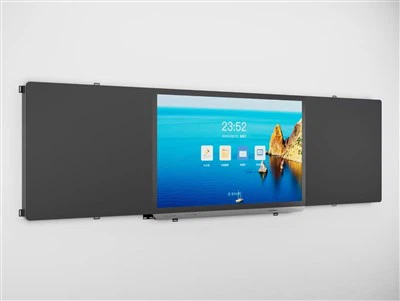
Ntse Board Standactive Waiwboard
Qhov kev txiav no - ntug ntaus nta ib tug loj, siab - txhais cov lus txhais uas muaj cov siv lead ua - cov zaub ntshiab. Qhov ntau - kov technology tso cai rau kev sib cuam tshuam ntuj thiab intuitive, ua rau ntau tus neeg siv los koom nrog ib txhij. Seb nws yog cov tub ntxhais kawm koom tes nrog ib pab pawg project lossis cov npoj yaig hluav taws xob hauv lub rooj sib tham, txhua tus tuaj yeem pab txhawb kev sib zog.
Rooj Sib Tham Chav Digital Signage
Peb 65 nti lub rooj sib tham chav digital signage nrog lub koob yees duab yog kev ua si-hloov pauv kev daws teeb meem. Qhov kev sib tham hauv lub xeev-ntawm-cov duab sib tham sib txuas ntawm cov khoom siv hluav taws xob ntawm cov koob yees duab loj, cov siv ua kom meej nrog lub koob yees duab siab txhais.
Kev sib tham sib pab sib tham rau kev qhia
Peb lub rooj sib tham sib pab rau kev qhia yog ib qho cuab yeej tawm tsam uas tau teeb tsa los hloov chaw ib puag ncig. Qhov no tsis yog ib qho dog dig dog dig; Nws yog lub rooj vag txhawm rau txhim kho, kev sib koom tes, thiab cov kev qhia paub zoo.
Featuring lub ntsiab txhais cov ntsiab lus kov kov, nws tso cai rau kev cuam tshuam rau kev sib cuam tshuam. Cov kws qhia ntawv tuaj yeem sau tau, kos, thiab cim tau nrog qhov muaj stylus lossis txawm tias lawv cov ntiv tes, ua si ntawm cov tshuaj pleev ib txwm muaj thaum ntxiv digital ntug.
Chaw ua uas tsis tau haus
|
Vaj Huam Sib Luag |
55 nti (16: 9) |
|
Backlight Hom |
D- LED |
|
Zaub cheeb chaw |
1211.2(H) ×682(V) |
|
Cov Lus Qhia Tawm |
3840 (H) × 2160 (v) (UHD) |
|
Xim Qaum |
8bit, 1.07b |
|
Ci ntsa iab |
400CD / ㎡ |
|
Piv sib piv |
5000: 1 (Ntaus.) |
|
Pom lub kaum ntse ntse |
178 degree (h) / 178 degree (v) |
|
Backlight lub neej |
For>35, 000} teev |
|
Embedded kov kev sib xyaw |
Ua-hauv ib-thooj |
|
Txoj kev sau |
Finger, touch pen, or other>2.5 hli |
|
Tus naj npawb ntawm kov cov ntsiab lus |
Ntawm 20 cov ntsiab lus |
|
Kov Daws Teeb Meem |
32767*32767 |
|
Kov Kev Xam Pom |
± 1 hli |
|
Ib leeg yog hais txog cov lus teb ceev |
<8ms |
|
Yam tsawg kawg nkaus tus kheej lub cev |
2.5mm (txhawb nqa 2.8mm ob chav nplua cwj mem puv npo sau ntawv) |
|
KOM COJ LUAM |
Tus lej theoretical yog tsis kawg |
|
Cov tsav tsheb |
System tsis siv neeg cim cim, tsis muaj tsav |
|
Txhawb System |
Windows7 / 10, Android, Mac OS |
|
Kev khiav hauj lwm kub |
{{0 {}} ~ {+50 degree |
Cov txiaj ntsig ntawm kev sib tham Wheboard

Touchscreen:Ib qho ntawm qhov tseem ceeb ntawm kev sib tham wickboard yog qhov tseeb tias nws muaj lub touchscreen thiab tso cai rau cov neeg siv hloov cov ntaub ntawv hauv qhov screen nrog lawv cov ntiv tes. Qhov sib ntxiv ntawm cov yeeb yaj kiab no tau ua nws cov kev siv ntau dua thiab ua tau zoo. Lub farmscreen tseem ua rau cov chav kawm rau cov menyuam yaus ntau dua kev lom zem thaum lawv koom nrog kom tau ntau dua. Tus kws qhia kuj tseem tuaj yeem txav tau yooj yim txav cov ntaub ntawv nyob ib ncig ntawm TouchScreen feature ntawm cov neeg mloog khoom uas sib tham sib tham.
Kev Pab Online:Cov kev sib tham sib txuas lus pub dawb tso cai rau cov neeg siv nkag mus rau hauv lub vev xaib los ntawm lub cuab yeej. Yog li cov kws qhia tuaj yeem pab tau kev pab ntawm cov software uas muaj nyob hauv Is Taws Nem. Kev siv cov ntawv sib tham ntawm cov whoolboard tseem ua rau cov kws qhia ua yeeb yaj duab los ua yeeb yaj kiab los ntawm Is Taws Nem thaum lawv xav tau.
Kev Ntsuam Xyuas:Qhov kev ua siab zoo uas cov lus no muab cov neeg thov nyiaj dawb no muab cov chav kawm deb dua thiab cov lus qhia. Kev koom tes ntawm cov tub ntxhais kawm thiab kev sib koom tes los ntawm lawv sab nce ntxiv uas txhim kho qhov zoo ntawm chav kawm.
Cov cuab yeej ntse:Qhov kev sib tham sib yooj yim wieboard muaj ntau yam cuab yeej rau cov kws qhia uas ua rau lawv txoj haujlwm yooj yim dua. Qee cov cuab yeej ntse no yog lub zog loj, pointer, tsom teeb, screen ntes thiab lwm yam.
Ntim

Cov FAQ
Raws li ib qho ntawm cov kev tshaj lij kev sib tham sib txuas thiab cov muag khoom hauv Suav teb, peb tau nthuav tawm los ntawm cov khoom lag luam zoo thiab tus nqi zoo. Yog tias koj yuav mus yuav cov tshuaj txhuam hniav uas sib tham sib xyaw ua hauv Suav teb, txais tos kom tau txais kev hais tawm los ntawm peb lub hoobkas. Tsis tas li, cov kev pabcuam customized yog muaj.
